The "Pixar-Style" Trend Taking Over Instagram
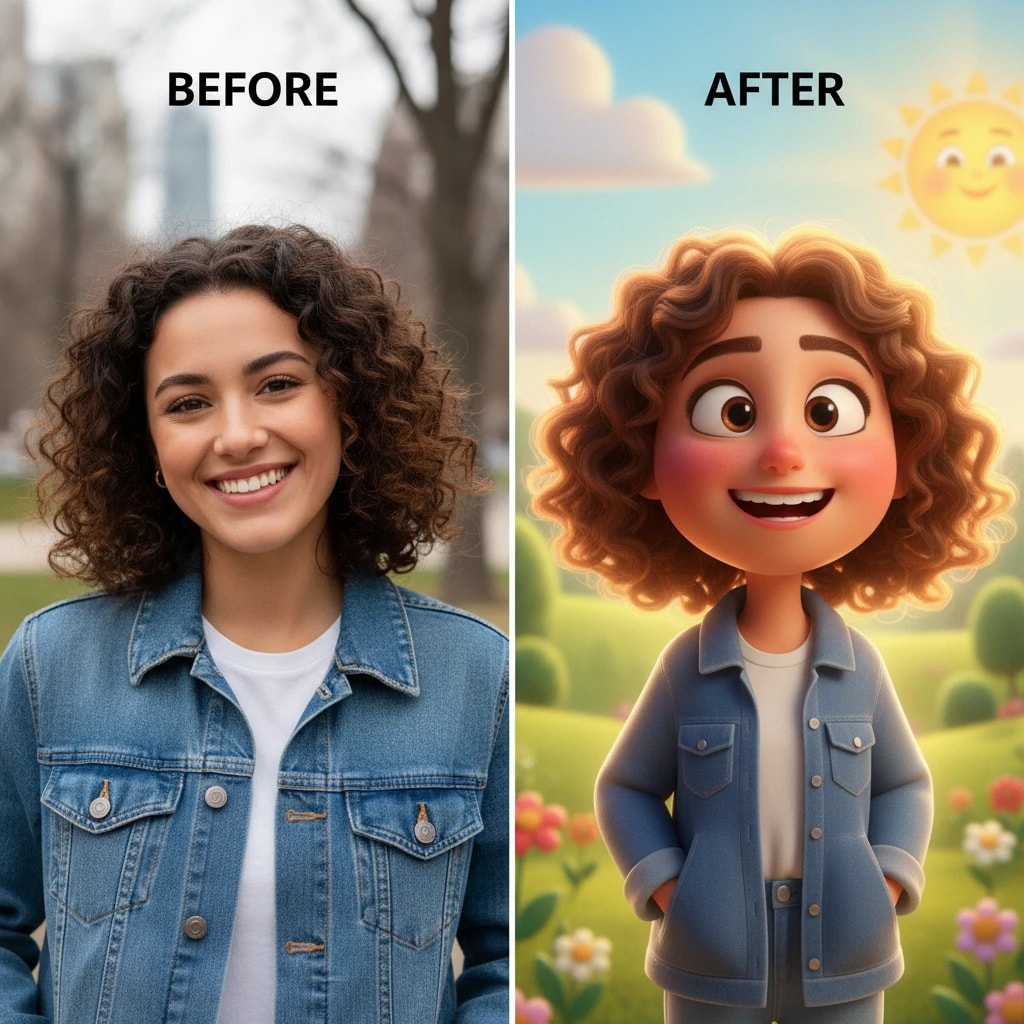
Have you seen those cute, 3D animated style profile pictures taking over Instagram, WhatsApp, and Facebook? From Bollywood celebrities to college students, everyone is jumping on the cartoon avatar trend. The good news? You don't need to hire a digital artist or pay expensive apps to get one. With our Free Photo to Cartoon AI, you can transform any selfie into a movie-quality character in seconds, completely free of charge.
This viral trend started in 2024 when apps like Lensa AI became popular, but they charged premium prices. In 2025, Indian creators discovered that they could achieve the same stunning results using free AI tools like ours, leading to millions of cartoon profile pictures across social media platforms.
Why Use AI for Cartoons?
Traditional digital art takes hours of work from skilled artists and can cost anywhere from ₹500 to ₹5000 per image. AI-powered cartoon conversion takes mere seconds and costs nothing. Our advanced AI preserves your unique facial features—your smile, your eyes, your hairstyle, even your distinctive expressions—but renders them in a beautiful, soft-shaded 3D style reminiscent of popular animated movies like Pixar's "Inside Out" or "Toy Story".
The technology behind this is fascinating. Our AI uses deep learning algorithms trained on thousands of animated character designs. It analyzes your facial structure, identifies key features, and then applies artistic transformations that maintain your likeness while giving you that polished, animated movie character look.
Different Cartoon Styles Available
Not everyone wants the same Pixar look. Our tool supports multiple cartoon styles, each with its own unique appeal:
- Pixar/3D Style: Soft, rounded features with smooth shading—perfect for a friendly, approachable look.
- Anime Style: Large expressive eyes, stylized features—great for a more dramatic, artistic appearance.
- Disney Style: Classic animation look with vibrant colors and smooth lines.
- Oil Painting Style: Artistic, painterly effect that looks like a classical portrait.
- Watercolor Style: Soft, dreamy effect with flowing colors.
- Sketch/Line Art: Clean, minimalist black and white line drawing style.
Step-by-Step Guide to Creating Your Cartoon Avatar
Creating your cartoon avatar is incredibly simple. Follow these detailed steps to get the best results:
- Choose Your Best Photo: Navigate to the Image to Cartoon tool. Select a clear, well-lit photo where your face is clearly visible. Front-facing photos work best, but side profiles can also produce great results.
- Upload Your Image: Click the upload button and select your photo. Supported formats include JPG, PNG, and WebP. The tool automatically detects and crops your face.
- Add a Style Prompt (Optional but Recommended): While the tool is smart enough to create great results automatically, you can guide it for specific looks. Type prompts like:
- "Pixar style, 3D animation, soft lighting"
- "Anime style, large eyes, vibrant colors"
- "Disney princess style, elegant, graceful"
- "Oil painting portrait, classical art style"
- Generate Your Cartoon: Hit the "Generate" button and watch the AI work its magic. The process typically takes 5-10 seconds.
- Review and Refine: Don't like the first result? Try adjusting your prompt or upload a different photo. You can generate multiple variations until you find the perfect one.
- Download & Share: Once satisfied, download the high-resolution image and update your social media profiles. Share it on Instagram, WhatsApp, Facebook, or use it as your profile picture anywhere.
Tips for Best Results
To get the most stunning cartoon conversion, follow these professional tips:
- Lighting is Key: Use photos with good, even lighting. Natural daylight works best. Avoid harsh shadows or overly dark photos as they can confuse the AI.
- Face Visibility: Ensure your face is clearly visible. Remove sunglasses, hats, or anything that obscures your features. The AI needs to see your eyes, nose, and mouth clearly.
- Single Subject Works Best: Avoid group photos. The tool is optimized for single-person portraits. If you want a group cartoon, process each person separately and combine them later.
- Expression Matters: Try different expressions! A big smile, a thoughtful look, or a playful expression all translate beautifully into cartoon style. Experiment with various photos to see which expression works best.
- High Resolution Photos: While the tool works with any photo, higher resolution images (at least 500x500 pixels) produce better results with more detail.
- Background Consideration: Simple backgrounds work better than cluttered ones. The AI focuses on your face, but a clean background helps it understand the composition better.
Creative Uses for Cartoon Avatars
Beyond just profile pictures, cartoon avatars have numerous creative applications:
- Social Media Branding: Create a consistent cartoon avatar across all your social media platforms for brand recognition.
- YouTube Channel Art: Use your cartoon avatar in YouTube channel banners, thumbnails, and video intros.
- Business Cards: Add a professional yet friendly cartoon avatar to your business cards or email signatures.
- Gift Personalization: Create cartoon versions of family members for personalized gifts, mugs, or t-shirts.
- Gaming Avatars: Use your cartoon avatar as a profile picture in gaming platforms and apps.
- Presentation Slides: Add a professional cartoon avatar to your presentation slides for a modern, engaging look.
- Wedding Invitations: Create cartoon versions of the bride and groom for unique, personalized wedding invitations.
The Technology Behind Photo-to-Cartoon Conversion
Our AI uses advanced neural networks trained on millions of portrait images and animated character designs. The process involves several sophisticated steps:
- Face Detection: The AI first identifies and isolates your face from the background.
- Feature Analysis: It analyzes key facial features—eye shape, nose structure, mouth, jawline, and facial proportions.
- Style Transfer: The AI applies the chosen cartoon style while maintaining your unique facial characteristics.
- Color Optimization: Colors are adjusted to match the chosen style—vibrant for anime, soft for Pixar, etc.
- Rendering: The final image is rendered with appropriate shading, lighting, and artistic effects.
Privacy and Security
We take your privacy seriously. The photos you upload are processed in real-time using secure, encrypted connections. Your images are:
- Not Stored: Photos are processed and immediately deleted from our servers. We don't keep copies of your images.
- Not Shared: Your photos are never shared with third parties or used for training purposes without explicit consent.
- Secure Processing: All image processing happens on secure servers with industry-standard encryption.
- Session-Based: Once your session ends, all temporary data is automatically wiped.
Feel completely safe to experiment with your photos. We've processed millions of images and maintain a 100% privacy record.
Common Issues and Solutions
Sometimes things don't go as planned. Here are solutions to common issues:
- Face Not Detected: Ensure your face is clearly visible and well-lit. Try a different photo with better lighting.
- Results Look Too Different: The AI sometimes exaggerates features. Try adding "realistic cartoon" or "maintain facial features" to your prompt.
- Colors Look Off: Specify color preferences in your prompt, like "warm skin tones" or "natural colors".
- Background Issues: If the background looks strange, try cropping your photo to focus more on your face before uploading.
Conclusion
The cartoon avatar trend is here to stay, and now you have access to the best free tool to create yours. Whether you want a Pixar-style profile picture, an anime-inspired avatar, or a classical portrait effect, our Photo to Cartoon AI makes it possible in seconds. Join millions of Indian creators who are already using this tool to create stunning cartoon avatars. Start creating yours today and watch your social media engagement soar!
Frequently Asked Questions
Does it work on mobile phones?
Yes, our website is fully responsive and works perfectly on all smartphones, tablets, and desktop devices. You can create cartoon avatars directly from your phone's browser.
How long does it take to generate a cartoon?
Most cartoons are generated in 5-10 seconds depending on server load and image complexity. Simple portraits are usually faster, while complex images with multiple elements may take slightly longer.
Can I use the cartoon avatar for commercial purposes?
Yes! All cartoon avatars generated on our platform come with full commercial usage rights. You can use them for business, social media, marketing, or any commercial purpose.
What file formats are supported for upload?
We support JPG, PNG, and WebP formats. The maximum file size is 10MB. For best results, use high-quality images with good resolution.
Can I create cartoon versions of multiple people?
The tool works best with single-person photos. For group photos, we recommend processing each person separately and then combining the results using image editing software.
Will my original photo be modified or deleted?
No, your original photo remains untouched. We create a new cartoon version without modifying your original image. Your original photo is never stored on our servers.
Can I customize the cartoon style after generation?
While you can't edit the generated cartoon directly on our platform, you can regenerate with different style prompts. For advanced editing, you can download the image and use image editing software like Photoshop or GIMP.